Last updated: November 16, 2026 · Category: Guide · Editorial review · About the authors
To advertise a Discord server, or promote it, is to share its invite in places where the right people will see it: server directories, advertising servers, partner servers, your social profiles, and communities that allow self-promotion. Posting the link is the easy part. Knowing which of those places brought members who stayed is what lets you stop wasting time on the rest.
This guide covers where to advertise, how to write the ad, what breaks Discord's rules, and how to measure each channel, first with Discord's own tools and then with a tracker.
Key Takeaways
- Give every advertising channel its own invite link. Discord counts the uses of each invite, so separate links are the simplest way to compare channels.
- Avoid join-for-join schemes, DM campaigns, and bought members, which Discord's own policies name as manipulation or spam, and read the same policy before rewarding invites.
- Judge a channel by how many of its members are still there after a week or two, not by how many joined on day one.
Before You Advertise: Make the Server Worth Joining
An ad brings people to the door. What they find decides whether they stay. Before you post anywhere, check three things.
- A clear first screen. New members should see what the server is for and where to start. Onboarding questions, a welcome message, and short rules help.
- Visible activity. A channel that has been quiet for days tells visitors the server is empty. Advertise when members are around to answer.
- A long-lasting invite for each channel. An invite that expires after 7 days breaks every ad that used it. How long Discord invites last explains how to make a link that does not expire, or how to set the longest expiry your server allows.
Where to Advertise a Discord Server
Most free promotion falls into six kinds of places. Each one reaches a different audience. A server directory is a website where people browse public Discord servers by topic or tag.
| Where | How it works | Best for | Watch out for |
|---|---|---|---|
| Server directories | Websites where people browse servers by tag. Some rank listings by recent "bumps" | Topic-specific servers | Each directory has its own rules; read them before listing |
| Advertising servers | Discord servers with channels where members post their own server ads | Quick, small bursts of visibility | Many members are there to advertise, not to join |
| Partnerships | Two similar servers post each other's invite in a partner channel | Servers with an overlapping audience | Keep it to a link swap, not a member swap |
| Social media and video | Your invite in a profile, a video description, or a stream panel | Creators and projects with an existing audience | Use a permanent link, or the longest expiry allowed |
| Forums and communities | Topic forums, subreddits, or game hubs that allow self-promotion | Niche servers | Read each community's self-promotion rules |
| Server Discovery | Discord's own directory of public servers | Community servers with at least 1,000 members | Other eligibility requirements apply |
Server Discovery has the strictest entry rules of the six. How to get listed in Server Discovery covers the requirements.
Writing a Server Ad
A good ad answers four questions in a few lines: what the server is about, who it is for, what members do there, and where to join. A short template:
[Server name]: a [topic] community for [who]. We run [two or three concrete activities]. [One line on what makes it different.] Join: [one invite link for this channel]
Keep it specific. "A friendly community for everyone" tells a reader nothing. "Weekly pixel-art challenges for beginners, with feedback from other members" tells them whether they belong.
What Not to Do
Some growth tactics look like advertising but break Discord's rules.
- Join-for-join and member exchanges. Discord's Platform Manipulation Policy Explainer (dated March 15, 2024, retrieved 2026-11-01) prohibits "artificially inflating server membership (for example, via 'join-for-join,' 'invite rewards,' purchasing fake members)". Its advice is to "Grow your server organically".
- DM campaigns. Discord's Community Guidelines (last updated August 29, 2025, retrieved 2026-11-01) say: "Do not send unsolicited bulk messages (or spam) to others." Sending your invite to many strangers by DM fits that description.
- Bought members. Purchased members are named in the same policy. They also add nothing: they do not talk, and they distort every number you use to judge your channels.
Directories and communities usually add their own rules on top, such as how often you can post. Breaking them can get the listing or your account removed from that place.
Paid Discord Ads Are a Different Thing
Discord's own ad products are a separate channel. In a press release dated September 29, 2026 (retrieved 2026-11-01), Discord said its Ads Manager was "now available with managed access for a select group of advertisers", with self-serve access "planned for early 2027". The formats it describes are Quests and Video Quests. The announcement does not say whether a server owner can use Ads Manager to promote a server.
For most server owners, the realistic options are the free channels above, or paid placements sold by individual directories and advertising servers.
Disclosure: we are building a pay-per-click option of our own, InviteForge Ads. It is not open yet (waitlist only), so it is not one of the options above.
Give Every Channel Its Own Invite
The single most useful habit is one invite link per channel: one for the directory, one for the partner server, one for your video descriptions. Discord's invite resource documentation (retrieved 2026-11-01) describes each invite's uses field as the "number of times this invite has been used", so every link carries its own count.
Name the links in a note you keep, because Discord shows codes, not labels. A vanity URL is a single server-wide link, so it cannot separate channels; keep it for the places where a memorable link matters more than measurement.
Measuring Each Channel with Discord's Own Tools
Discord gives you three views, each with limits.
- Invite uses. Server Settings > Invites lists your active invites. It is also where Discord's Pause Invites FAQ (retrieved 2026-09-28) says invites are paused. The use count tells you how many joins each link produced, not how many stayed, and it disappears when the invite expires or is deleted.
- The Members page. Discord's Members Page article (retrieved 2026-09-28 and 2026-10-12) says it shows "how they joined the server", that invite codes require the Manage Server permission, and that the page works on browser and desktop. A Join Method filter lists the current members who joined through one code. Comparing that list with the link's use count gives a rough "still here now" figure per link, counted by hand. There is no date window, and some joins show as "Unknown".
- Server Insights. Discord's Server Insights FAQ (retrieved 2026-09-03) describes it as available to Community servers with more than 500 members, for people with Administrator or the View Server Insights permission. It reports trends for the whole server, not per invite.
Together these answer "how many joined through this link", "how did this member get here", and, with some manual work, "how many from this link are still here". What they do not give you is a date window, a record that survives deleted links, or a comparison done for you.
Measuring Each Channel with an Invite Tracker
An invite tracker records which invite each member used and keeps that record after they join, even when the link is later deleted. That adds the date window and the automatic comparison the native tools lack. Other trackers, such as InviteLogger and Invite Tracker, also record which invite each member used; check what each reports per link and its current plans.
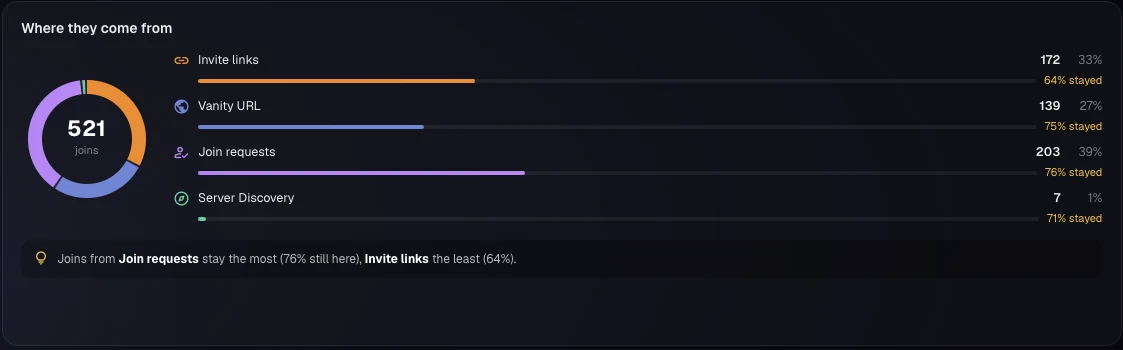
In InviteForge, Dashboard > Overview shows where members come from (invite links, the vanity URL, join requests, Server Discovery, bots and apps) and the top five invite links by joins, with what share of their members are still in the server. The period you can view depends on the plan: 24 hours or 7 days on Free, plus 14 days on Supporter, plus 30 days on PRO.
To measure one ad push, a campaign under Dashboard > Campaigns records the numbers between two moments, for example the week a partner posted your link. Free runs one campaign at a time, of up to 24 hours; Supporter two of up to 7 days; PRO five of up to 30 days. The top invite links and the retention row in a campaign report are on Supporter and PRO and cover the whole window. Campaign top links show joins only, so use Overview for per-link retention. The invite analytics summary gives an overview of the dashboard.
Reading the Results
Compare channels on the same question: of the people who joined through this link, how many are still here after a week or two?
As a made-up example: if link A brings 50 joins and keeps 5, and link B brings 15 and keeps 10, link B is doing more for you. Fake or throwaway accounts also show up here: a link with many joins and almost no one left is worth a closer look. Reading your real vs. fake join ratio explains what those numbers mean.
Once you know which channels keep members, put your time there. If members themselves are your best channel, growing a server through member invites covers referral programs, and running a fair invite competition covers recruiting contests. Discord's policy names "invite rewards" among its examples of artificial growth, so read that guide's section on Discord's rules before you reward invites.
Frequently Asked Questions
Where can I advertise my Discord server for free?
Server directories, advertising servers, partnerships with similar servers, your social media and video descriptions, and relevant forums or communities that allow self-promotion. Community servers with at least 1,000 members can also enable Server Discovery.
Is it allowed to advertise a Discord server?
Yes, as long as you follow Discord's rules and the rules of the place where you post. Discord's policies prohibit unsolicited bulk messages, join-for-join schemes, and buying members, so avoid DM campaigns and member exchanges.
Can I pay Discord to advertise my server?
Not according to Discord's announcement. In September 2026, Discord said its Ads Manager was available with managed access for a select group of advertisers, with self-serve access planned for early 2027. Its announcement does not say whether a server owner can use it to promote a server.
How do I know which advertising channel works best?
Give each channel its own invite link, then compare how many people joined through each one and how many are still in the server a week or two later. Retention matters more than raw joins.
What should a Discord server ad include?
What the server is about, who it is for, what members do there, and one invite link. A short, specific ad works better than a list of every channel and role.
Related reading
- About InviteForge (contact the team from that page)